

HivePaaS
Docker Swarm 기반 오픈소스 자체 호스팅 PaaS, SSL·백업·자동 확장 지원
아직 감지된 업데이트가 없습니다. GitHub 릴리스가 나오면 여기에 보입니다.
최근 완료된 8시간 회차 사이 GitHub 스타 증가량 순
Docker Swarm 기반 오픈소스 자체 호스팅 PaaS, SSL·백업·자동 확장 지원
AI 에이전트를 만들고 클라우드에서 실행합니다
Native Shell은 모든 플랫폼의 앱 안에서 만들어지는 AI UI입니다
항상 켜져 있는 무료 오픈소스 개인 AI 에이전트. Muse·Dots·Instinct·Town 대신 자체 호스팅 가능
무료이며 공정한 소스
개인 계정의 공개 저장소 소유자는 GitHub로 로그인해 운영자를 확인하고 소개를 직접 관리할 수 있습니다. 관리자 승인은 필요하지 않습니다.
로그인한 뒤 확인 파일을 만들어 이 저장소의 기본 브랜치에 30분 안에 커밋해 주세요. 다른 브랜치나 포크의 파일은 인정하지 않습니다. 파일을 올린 뒤 아래에서 확인하면 관리자 승인 없이 관리할 수 있습니다. 자격을 유지하려면 파일을 남겨 두세요.
로그인이 필요하면 로그인 화면으로 이동합니다. 로그인 후 이곳으로 돌아와 원하는 확인 버튼을 다시 눌러 주세요.
프로젝트 폴더에서 /nomorevibe verify를 실행하면 소유권을 확인하고 소개를 직접 관리할 수 있습니다.
1분 만에 확인하기X (Twitter) profile and post cards for your GitHub README. Free, no sign-up.
저장소 README에서 가져옴
README 전체를 불러오는 중입니다.
README 전문 보기 ↗X (Twitter) profile and post cards for your GitHub README. Free, no sign-up, no API key — just paste a URL.
| Aurora | Terminal |
|---|---|
| Paper | Brutal |
|---|---|
| Receipt | Sunset |
|---|---|
Try it: https://readme-x-cards.vercel.app/ — type your username, pick a theme, copy the snippet.
[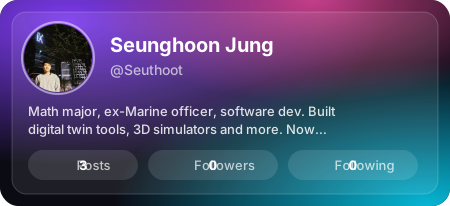](https://x.com/Seuthoot)
[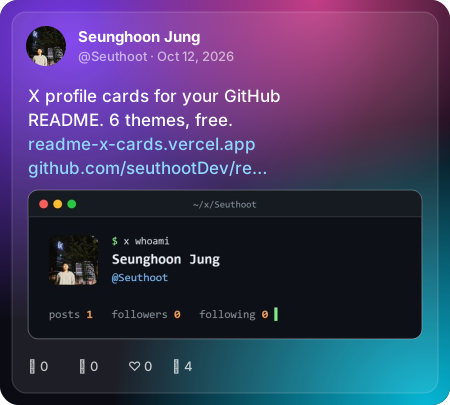](https://x.com/Seuthoot)
[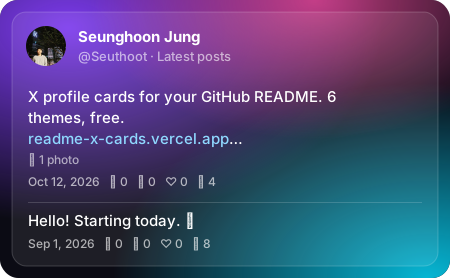](https://x.com/Seuthoot)
One image with your count latest posts (1–5). For separate cards instead, use /api/post with index=1, index=2, …
[](https://x.com/jack/status/20)
Want to show your pinned post? Use this with the pinned post's ID (paste its link on the landing page). The data sources don't say which post is pinned, so if you pin a different one later, update the ID.
GitHub picks the <source> that matches each viewer's theme. Here Aurora shows in dark mode and Paper in light mode:
<a href="https://x.com/Seuthoot">
  <picture>
    <source media="(prefers-color-scheme: light)" srcset="https://readme-x-cards.vercel.app/api/profile?user=Seuthoot&theme=paper">
    <img src="https://readme-x-cards.vercel.app/api/profile?user=Seuthoot&theme=aurora" alt="X profile" width="450">
  </picture>
</a>
The landing page builds this snippet for you.
| Endpoint | Parameter | Values | Default |
|---|---|---|---|
/api/profile | user | X username (letters, digits, _, max 15) | required |
/api/post | id | Post ID (the number in the post URL) | — |
/api/post | user | X username — shows their latest post | — |
/api/post | index | 1–10, n-th latest post (with user) | 1 |
/api/feed | user | X username | required |
/api/feed | count | 1–5, how many latest posts | 3 |
| all | theme | aurora, terminal, paper, brutal, receipt, sunset | aurora |
| all | hide | comma-separated: bio, metrics, views, media, date, border | — |
| all | locale | date language, e.g. ko, ja, de, pt-BR | en-US |
/api/post needs either id or user; id wins if both are given.
hide=border applies to the themes with an outline (aurora, terminal, paper). The terminal theme always prints ISO dates, so locale does not change it.
t.co links appear as their real destination (vercel.com/blog/…).hide=media leaves it out. The receipt theme prints no images.Multi-post cards keep to text, with the same highlighting.
Cards are cached: profiles for 6 hours, latest posts (and feeds) for 1 hour, specific posts for 24 hours. GitHub also caches README images, so changes can take a little longer to show up.
No environment variables needed. Running your own instance keeps your cards working even if the public one is rate-limited.
Optional: connect an Upstash Redis database to the project (it sets KV_REST_API_URL / KV_REST_API_TOKEN or UPSTASH_REDIS_REST_URL / UPSTASH_REDIS_REST_TOKEN). Each card then remembers its last successful data for 7 days, and when X data is briefly unavailable it shows that instead of an error card.
src/themes/<name>.ts exporting an object that implements Theme (src/themes/types.ts): renderProfile, renderPost, renderFeed, renderError, each returning a complete SVG string.src/themes/index.ts.describe.each lists in tests/theme-contract.test.ts and tests/theme-feed.test.ts (plus any theme-specific checks) and run npm test, then npm run smoke to render previews.Rules: card width 450px, escape every external string with escapeXml, never reference external URLs (GitHub blocks them inside SVG images — avatars and previews arrive as data URIs). Post text goes through richText from src/themes/shared.ts for highlighting.
npm install
npm test          # unit tests, no network
npm run typecheck
npm run smoke     # renders real cards into docs/previews (uses the network)
npx vercel dev    # local server at http://localhost:3000
This project does not use the official X API. Data comes from unofficial public endpoints (X's embed syndication service and FxEmbed/fxtwitter), which may change or stop working at any time. Not affiliated with or endorsed by X Corp.
MIT


