
mesh-avatar-studio
일러스트를 코딩 에이전트와 로컬 편집기로 2D 메쉬 애니메이션 아바타로 변환
아직 감지된 업데이트가 없습니다. GitHub 릴리스가 나오면 여기에 보입니다.
최근 완료된 8시간 회차 사이 GitHub 스타 증가량 순
일러스트를 코딩 에이전트와 로컬 편집기로 2D 메쉬 애니메이션 아바타로 변환
Doop: 오픈소스 멀티플레이어 디자인 캔버스 및 AI 에이전트용 MCP
Scenario 이미지, 비디오, 오디오, 3D 전반에 걸친 맞춤형 워크플로우 구축
레이어가 있는 PSD를 편집 가능한 Live2D 모델로 변환
로컬 에이전트 데몬을 eda.* API와 연결해 회로·PCB 작업을 전달합니다
개인 계정의 공개 저장소 소유자는 GitHub로 로그인해 운영자를 확인하고 소개를 직접 관리할 수 있습니다. 관리자 승인은 필요하지 않습니다.
로그인한 뒤 확인 파일을 만들어 이 저장소의 기본 브랜치에 30분 안에 커밋해 주세요. 다른 브랜치나 포크의 파일은 인정하지 않습니다. 파일을 올린 뒤 아래에서 확인하면 관리자 승인 없이 관리할 수 있습니다. 자격을 유지하려면 파일을 남겨 두세요.
로그인이 필요하면 로그인 화면으로 이동합니다. 로그인 후 이곳으로 돌아와 원하는 확인 버튼을 다시 눌러 주세요.
프로젝트 폴더에서 /nomorevibe verify를 실행하면 소유권을 확인하고 소개를 직접 관리할 수 있습니다.
1분 만에 확인하기Animated SVG workflows for GitHub READMEs. Free browser editor, self-contained exports, and hosted image links.
저장소 README에서 가져옴
README 전체를 불러오는 중입니다. 아래는 저장된 발췌입니다.
Animated SVG workflows for GitHub READMEs, made in your browser.
This demo was generated with the project's own generate_workflow tool. No account, subscription, tracking, or analytics.
1. Open the editor and choose a preset or gallery example.
2. Edit the steps, icons, and appearance. The preview updates as you work.
3. Copy Markdown for a hosted image, or download workflow.svg and choose File in your repo.
For a hosted image, paste a URL directly:README 전문 보기 ↗Animated SVG workflows for GitHub READMEs, made in your browser.
Open the editor · Examples · Report a bug
This demo was generated with the project's own generate_workflow tool. No account, subscription, tracking, or analytics.
workflow.svg and choose File in your repo.
For a hosted image, paste a URL directly:
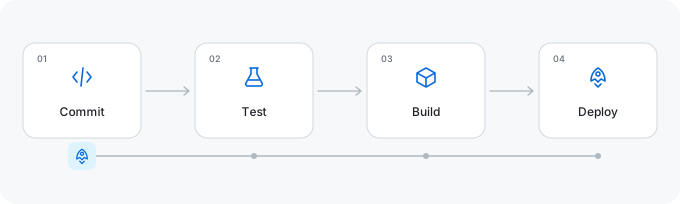
The editor runs entirely in your browser, including SVG downloads. Hosted images use the existing public SVG service and include the workflow settings in their URL. Optional Google Fonts requests send the font family and weight, without workflow text. Built-in fonts and downloaded SVGs work offline. Settings are saved on your device.
Page appearance is independent of SVG appearance. Animation follows connection order; it does not simulate concurrent execution.
Use Export JSON to save workflow.json alongside workflow.svg. Import JSON restores
the steps, icons, connections, manual positions, colors, and font settings. Files stay in your
browser; imports accept workflow configurations up to 16 KB. You can undo an import or reset.
The preview supports Ctrl/Cmd+Z and Ctrl/Cmd+Shift+Z (or Ctrl+Y). Text fields keep their native undo behavior. Arrange cards aligns or distributes all cards; alignment separates cards along the other axis to prevent overlap. Fit canvas to cards trims excess space, and Reset positions returns to the selected automatic layout.
Light / dark README generates a <picture> snippet using the built-in Light and Dark
palettes. It keeps the same labels, layout, connections, and font in both versions.
Image links use /svg; editor links use /? with the same parameters. Existing formats are unchanged.
| Parameter | Example | Meaning |
|---|---|---|
steps | Upload;Validate;Download | 3–12 labels; JSON arrays also accepted |
preset | deploy | Starting workflow |
theme | github | SVG palette |
traveler | file | Moving element |
duration | 8 | Complete loop, 2–30 seconds |
layout | snake | Horizontal, vertical, snake, or grid |
columns | 3 | 2–6 columns in a wrapped layout |
title | Release%20pipeline | Optional heading |
Use the editor to encode punctuation, custom connections, and palettes correctly. Full parameter reference · Supported options
Open the checked-in index.html directly, or use Node.js 22+:
npm ci
npm run build
npm run dev
Visit http://127.0.0.1:4173. Rebuild after changing source files. The editor uses vanilla JavaScript and CSS; server dependencies are kept out of the static editor except the browser font engine.
npm run lint
npm run type-check
npm run format:check
npm test
npm run build
npm run build:api
npx playwright install chromium
npm run test:browser
npm run benchmark
Development, deployment, and AI/MCP setup · Architecture
Does animation work in GitHub READMEs? Yes. Embed the SVG as an image; its CSS animation is self-contained. GitHub caches external images, so hosted changes may not appear immediately.
Hosted or in-repo? Hosted images are ready to paste. A checked-in SVG is versioned with your project and needs no image service. Shared URLs are public configuration, so keep secrets out of labels.
Reduced motion? Generated SVGs include prefers-reduced-motion. The preview pause button affects only the editor, not downloads.
File size? It depends on the number of steps and connections. Check the example files; outlined Google Fonts can increase size substantially.
Why not Mermaid or a GIF? Mermaid is useful for text-maintained diagrams. This tool makes small animated workflows with a visual editor. SVG stays sharp when resized; GIF stores raster frames.
Is data sent to a server? Editing and downloading run in your browser. Hosted embeds send settings in the image URL. The editor loads interface fonts from Google; optional workflow fonts go through our font endpoint. There are no accounts or analytics. Read the privacy policy for browser storage, hosting logs, and contact details.
| Repository | Workflow |
|---|---|
| infinuts/readme-flow-svg | The workflow generator uses its own animated SVG in its README. |
| infinuts/port2browser | This project uses this animated SVG project to demonstrate how the ai skill works. |
Add your public repository through community/repos.json. Submission guide.
Bug reports, documentation fixes, presets, and accessibility improvements are welcome. Read CONTRIBUTING.md, Code of Conduct, and security reporting. Keep generated SVGs self-contained and preserve existing URL behavior.
These are ideas, not delivery commitments:
See CHANGELOG.md for changes and launch TODOs for repository sharing suggestions.
MIT. Icons adapted from Tabler Icons; see third-party notices. Inspired by Readme Typing SVG and archgram.


