
Materializr
開源參數式 3D CAD 給創客 — 受限草圖、實體建模、螺紋、SVG 與文字雕刻、STL/STEP 匯出。Android、iPad、Linux、Mac、Windows。Vibe 編碼。
AI 翻譯
尚未偵測到更新。GitHub 發布版本後會顯示在這裡。
依最近已完成的 8 小時觀測回合間的 GitHub 星號增量排序
開源參數式 3D CAD 給創客 — 受限草圖、實體建模、螺紋、SVG 與文字雕刻、STL/STEP 匯出。Android、iPad、Linux、Mac、Windows。Vibe 編碼。
AI 翻譯
Turn one illustration into an animated 2D mesh avatar with a coding agent and a local editor
翻譯準備中
Doop is an open-source multiplayer design canvas and design MCP for Claude Code, Codex, and any AI agent. Design side by side with agents — free in beta.
翻譯準備中
AI drew your research figure. Tavotto makes it publication-ready: edit matplotlib figures on a canvas, lay out in mm, check journal rules. Free, open source.
翻譯準備中
個人 GitHub 帳號下公開儲存庫的擁有者可以登入並驗證所有權,自行管理介紹,無需管理員核准。
登入並產生驗證檔案,在 30 分鐘內將其提交至此儲存庫的預設分支。其他分支或分叉儲存庫中的檔案無效。然後在下方檢查檔案,即可無需管理員核准直接管理專案。請保留檔案以維持管理權限。
如需登入,將前往登入頁面。登入後請回到此處,再次點擊所選的驗證按鈕。
在專案資料夾中執行 /nomorevibe verify,即可驗證所有權並自行管理介紹。
一分鐘完成驗證Animated SVG workflows for GitHub READMEs. Free browser editor, self-contained exports, and hosted image links.
翻譯準備中
取自儲存庫 README
正在載入完整 README。 以下為已儲存的摘錄。
Animated SVG workflows for GitHub READMEs, made in your browser.
This demo was generated with the project's own generate_workflow tool. No account, subscription, tracking, or analytics.
1. Open the editor and choose a preset or gallery example.
2. Edit the steps, icons, and appearance. The preview updates as you work.
3. Copy Markdown for a hosted image, or download workflow.svg and choose File in your repo.
For a hosted image, paste a URL directly:檢視完整 README ↗Animated SVG workflows for GitHub READMEs, made in your browser.
Open the editor · Examples · Report a bug
This demo was generated with the project's own generate_workflow tool. No account, subscription, tracking, or analytics.
workflow.svg and choose File in your repo.
For a hosted image, paste a URL directly:
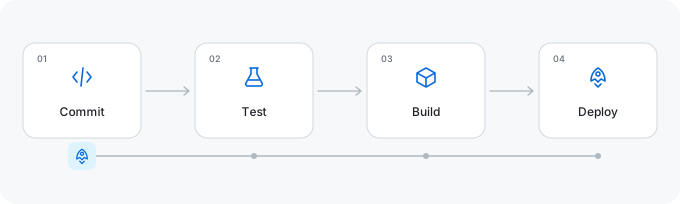
The editor runs entirely in your browser, including SVG downloads. Hosted images use the existing public SVG service and include the workflow settings in their URL. Optional Google Fonts requests send the font family and weight, without workflow text. Built-in fonts and downloaded SVGs work offline. Settings are saved on your device.
Page appearance is independent of SVG appearance. Animation follows connection order; it does not simulate concurrent execution.
Use Export JSON to save workflow.json alongside workflow.svg. Import JSON restores
the steps, icons, connections, manual positions, colors, and font settings. Files stay in your
browser; imports accept workflow configurations up to 16 KB. You can undo an import or reset.
The preview supports Ctrl/Cmd+Z and Ctrl/Cmd+Shift+Z (or Ctrl+Y). Text fields keep their native undo behavior. Arrange cards aligns or distributes all cards; alignment separates cards along the other axis to prevent overlap. Fit canvas to cards trims excess space, and Reset positions returns to the selected automatic layout.
Light / dark README generates a <picture> snippet using the built-in Light and Dark
palettes. It keeps the same labels, layout, connections, and font in both versions.
Image links use /svg; editor links use /? with the same parameters. Existing formats are unchanged.
| Parameter | Example | Meaning |
|---|---|---|
steps | Upload;Validate;Download | 3–12 labels; JSON arrays also accepted |
preset | deploy | Starting workflow |
theme | github | SVG palette |
traveler | file | Moving element |
duration | 8 | Complete loop, 2–30 seconds |
layout | snake | Horizontal, vertical, snake, or grid |
columns | 3 | 2–6 columns in a wrapped layout |
title | Release%20pipeline | Optional heading |
Use the editor to encode punctuation, custom connections, and palettes correctly. Full parameter reference · Supported options
Open the checked-in index.html directly, or use Node.js 22+:
npm ci
npm run build
npm run dev
Visit http://127.0.0.1:4173. Rebuild after changing source files. The editor uses vanilla JavaScript and CSS; server dependencies are kept out of the static editor except the browser font engine.
npm run lint
npm run type-check
npm run format:check
npm test
npm run build
npm run build:api
npx playwright install chromium
npm run test:browser
npm run benchmark
Development, deployment, and AI/MCP setup · Architecture
Does animation work in GitHub READMEs? Yes. Embed the SVG as an image; its CSS animation is self-contained. GitHub caches external images, so hosted changes may not appear immediately.
Hosted or in-repo? Hosted images are ready to paste. A checked-in SVG is versioned with your project and needs no image service. Shared URLs are public configuration, so keep secrets out of labels.
Reduced motion? Generated SVGs include prefers-reduced-motion. The preview pause button affects only the editor, not downloads.
File size? It depends on the number of steps and connections. Check the example files; outlined Google Fonts can increase size substantially.
Why not Mermaid or a GIF? Mermaid is useful for text-maintained diagrams. This tool makes small animated workflows with a visual editor. SVG stays sharp when resized; GIF stores raster frames.
Is data sent to a server? Editing and downloading run in your browser. Hosted embeds send settings in the image URL. The editor loads interface fonts from Google; optional workflow fonts go through our font endpoint. There are no accounts or analytics. Read the privacy policy for browser storage, hosting logs, and contact details.
| Repository | Workflow |
|---|---|
| infinuts/readme-flow-svg | The workflow generator uses its own animated SVG in its README. |
| infinuts/port2browser | This project uses this animated SVG project to demonstrate how the ai skill works. |
Add your public repository through community/repos.json. Submission guide.
Bug reports, documentation fixes, presets, and accessibility improvements are welcome. Read CONTRIBUTING.md, Code of Conduct, and security reporting. Keep generated SVGs self-contained and preserve existing URL behavior.
These are ideas, not delivery commitments:
See CHANGELOG.md for changes and launch TODOs for repository sharing suggestions.
MIT. Icons adapted from Tabler Icons; see third-party notices. Inspired by Readme Typing SVG and archgram.


